Hey. Yash here. If you are looking for the absolute best viral Gemini AI photo prompts, you are in the right place.
Let’s just be real for a sec. You’ve definitely seen those crazy, ultra-crisp portraits taking over Instagram Reels lately. And you probably caught yourself wondering what kind of insane camera setup they’re using.
Spoiler: they aren’t using one. It’s AI.
I’ve basically lived in front of my screen the past few days, just tearing apart Gemini Nano Banana Pro—yes, the exact model driving all those massive 2026 editing trends. Good news? I finally cracked it. I literally put together the only list of viral AI photo prompts you’re going to need right now.
Copy. Paste. Done.
And no, you won’t get that weird, plasticky AI look either. I tested every single prompt to death just to make sure they actually pass as real DSLR shots. Want those trending boy poses? Need that luxury lifestyle aesthetic but don’t want to drop cash on a studio shoot? Consider these ready-to-use prompts your cheat code.
Step 2: Scroll down this page, pick your favorite from these Best Viral AI Photo Prompts for Instagram Reels, and copy the text.
Step 3 (Optional but recommended): If you want the generated image to have your facial features, upload a clear picture of yourself into the chat first.
Step 4: Paste the prompt you copied right into the Gemini text box and hit send.
Step 5: Give it a few seconds. Gemini will give you a few different variations. Just download the one that looks the most natural to you.
Want a different look? Don’t be afraid to tweak the text! The best part about using viral AI photo prompts for Instagram Reels is that once you paste the prompt, you can easily change the outfit color…
Honestly, my DMs were getting annoying so I just decided to dump all my viral Gemini AI photo prompts right here. I was going to gatekeep these, but whatever. Just grab the exact text from the boxes below and paste it in.
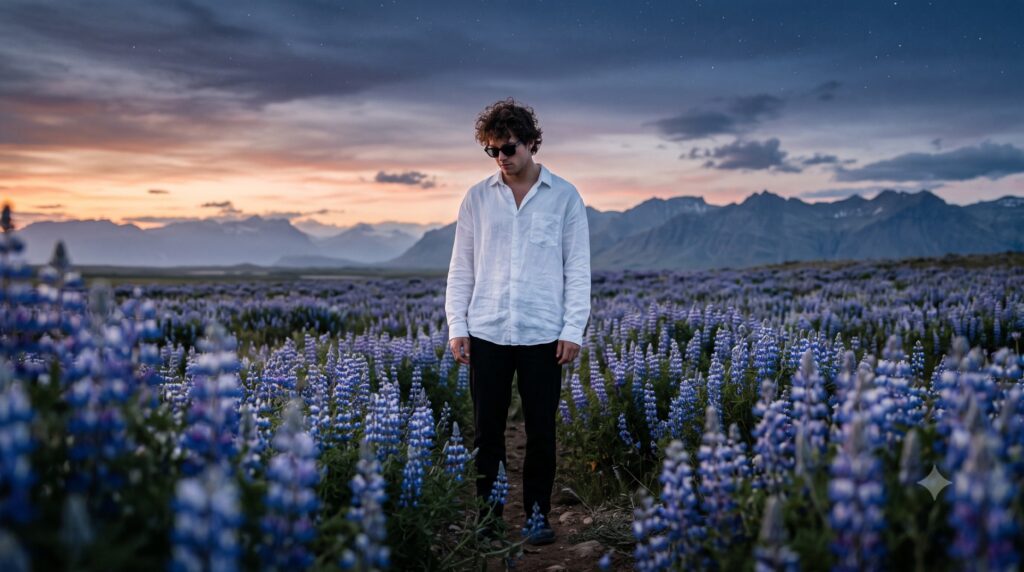
Prompt #1 The Personal Travel Diary Vibe
Let’s start with one of the most requested viral Gemini AI photo prompts for that moody, cinematic wanderlust aesthetic.
low angle full body cinematic photo of a young man standing alone in the middle of a vast field of blue and purple wildflowers at twilight during blue hour just after sunset, wearing an oversized white shirt with open collar and black sunglasses, curly dark hair slightly messy, head tilted down Looking towards the ground with a calm introspective expression, arms relaxed by his sides, surrounded by flowers reaching up around him in the foreground and background, distant mountain range on the horizon, dramatic sky with gradient from warm orange and pink near the horizon to deep indigo and starry night above, soft scattered clouds, very shallow depth of field with foreground flowers beautifully blurred and creamy bokeh, sharp focus on the subject, back and side rim light from the last sunset glow creating a gentle edge light on his hair and shirt, overall moody, dreamy and romantic atmosphere, ultra realistic detail, natural color grading with rich blues and purples, 85mm lens, wide aperture f/1.8, high resolution, cinematic composition, ultra detailed, photorealistic, premium editorial photography.
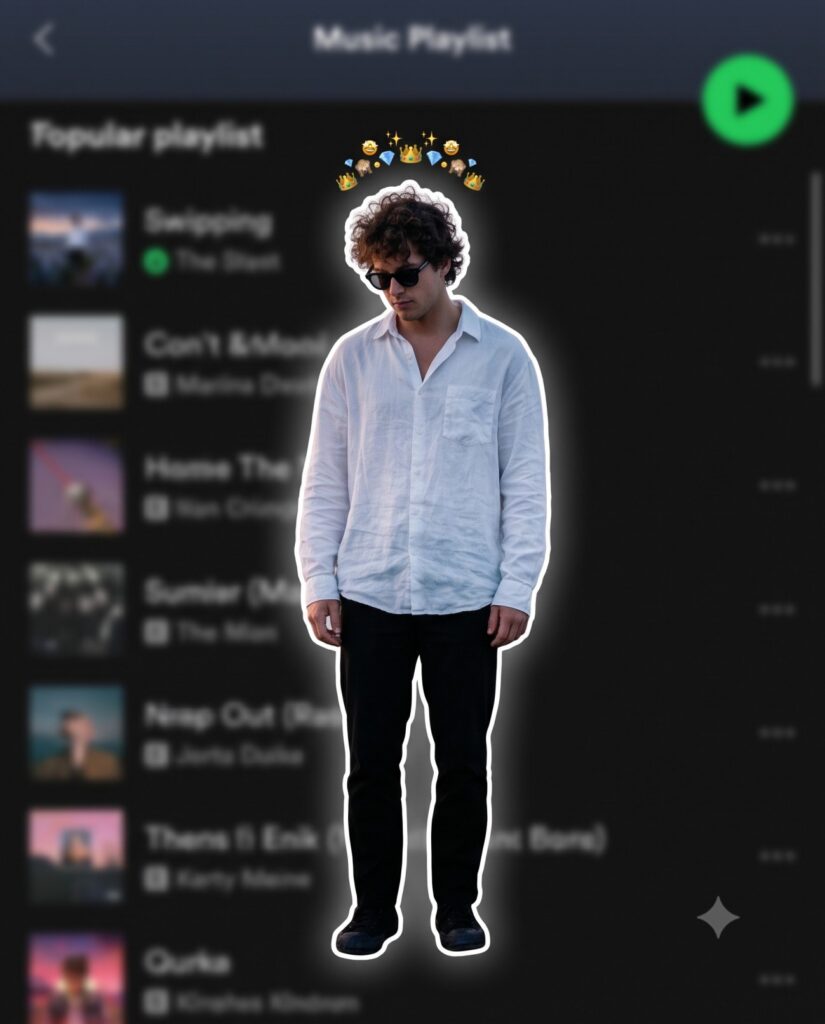
Prompt #2 The ‘Sticker Outline’ Trend: How to Create Edgy, Music-Inspired Portraits
If you want an edgy, music-inspired look, this is easily one of the best viral Gemini AI photo prompts trending right now.
Use the uploaded image as the ONLY identity reference. Keep the subject’s gender, face, facial structure, hairstyle, skin tone, age, clothing, body proportions, original pose, expression, hand position, camera angle, framing and perspective exactly unchanged. Create a premium Instagram Feed Post (1080×1350, 4:5) with a thin white sticker outline and soft white glow. Add one tiny compact emoji crown (10–12 emojis ) centered in a very tight curved arc, floating just above the hair with a clear small gap, about 15–20 px above the highest point of the hair, matching the reference. Keep the emojis small, closely packed, subtle, and never touching or overlapping the hair, forehead, face, or white outline. Never make the crown wide, oversized or scattered. Use the same clothing, hairstyle and pose. Background: heavily blurred dark-mode mobile music streaming app playlist with a premium cinematic look.
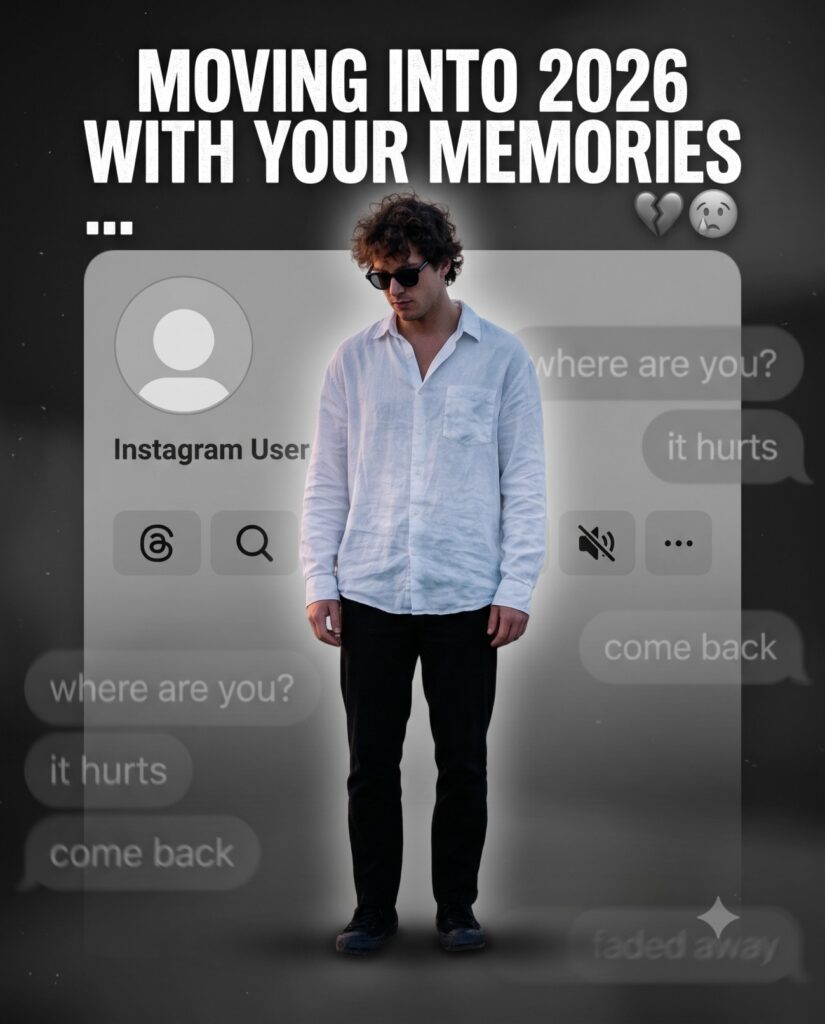
Prompt #3 Moving Into 2026 With Your Memories: How to Let Go of a Digital Ghost
Heartbreak edits are going crazy on Instagram, and out of all the viral Gemini AI photo prompts, this one gets the most views.
Create a dark, emotional Instagram heartbreak memories edit using the uploaded photo. Keep the person’s face, hairstyle, skin tone, body shape, clothes, and pose 100% unchanged. Do not modify identity. Design: • Background should be dark, faded, and slightly blurred. • Add a large semi-transparent Instagram profile interface behind the subject. • Profile picture should appear removed with a default Instagram avatar. • Username: “Instagram User” • Add Profile, Search, Mute, and Options icons. • Use a black and grey color theme with a soft vignette. • Add subtle film grain, motion blur, dust particles, and cinematic lighting. • Place the subject at the bottom center with a soft shadow. Text (large bold white font): “Moving into 2026 with your memories” Below the text add: … Additional effects: • Broken heart emoji • Sad emoji • Faded chat/message overlays in the background. • Instagram aesthetic, nostalgic breakup vibe. • Moody color grading with low saturation. • High contrast, realistic photo edit. • Soft glow around the subject. • Premium viral Instagram reel thumbnail style. • Ultra HD, photorealistic, 4K quality. • No cartoon, no anime, no AI-looking face. • Keep everything natural and cinematic.
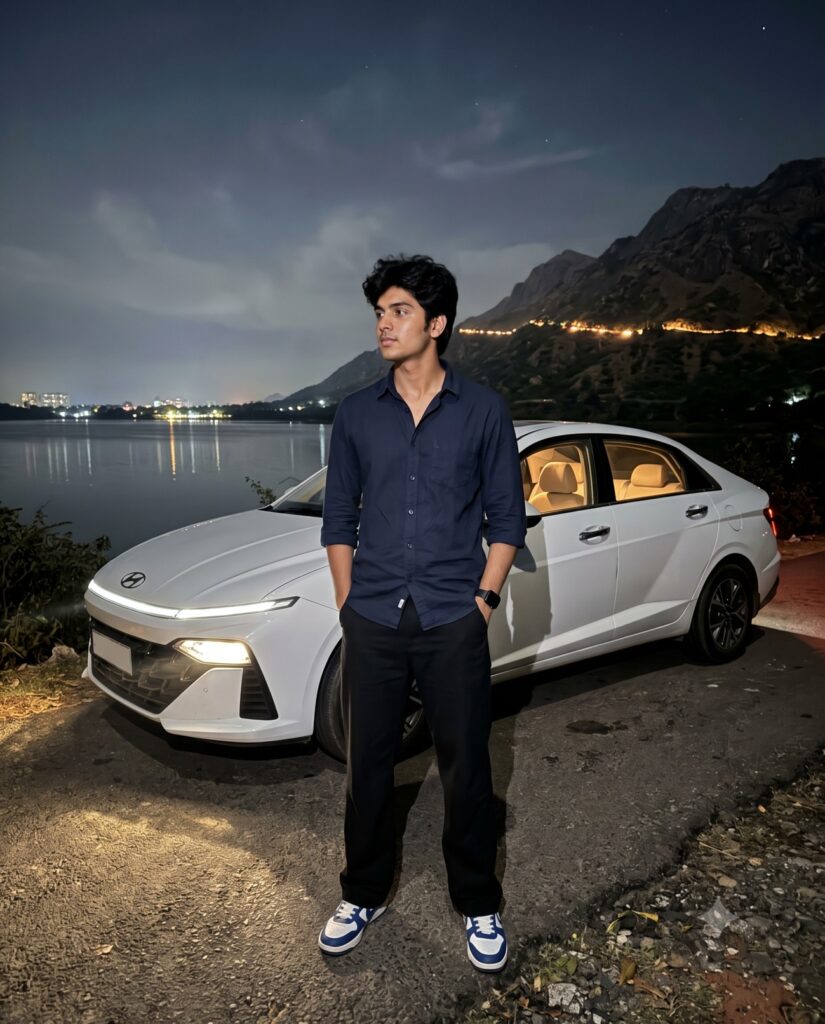
Prompt #4 The Therapy of Late-Night Drives: Finding Peace Away From the City
For the late-night aesthetic lovers, drop this into your generator. It is my absolute favorite out of these viral Gemini AI photo prompts.
image Ultra-realistic casual smartphone photograph captured on an iPhone 15 Pro using the standard 1× rear camera (26mm wide-angle lens). Vertical 4:5 full-body composition with an eye-level handheld perspective. A young South Asian man with medium-fair skin, thick slightly messy black hair, and a naturally lean physique is standing casually in front of a white Hyundai sedan parked beside a calm lakeside road at night. He is wearing a dark navy-blue full-sleeve button-up shirt with the sleeves casually rolled up, loose black
straight-fit trousers, blue-and-white sneakers, and a black smartwatch. Both hands are in his pockets while he looks naturally toward his left with a relaxed, thoughtful expression.
The white Hyundai sedan is positioned slightly behind him at a three-quarter front angle. The LED headlights are switched on, casting realistic pools of light across the road without overexposure. The car interior glows softly with warm ambient lighting visible through the windows. The license plate appears authentic but not emphasized.
In the background is a peaceful lake reflecting distant city lights. A dark mountain range rises behind the lake with a winding line of warm lights tracing the hillside. The night sky is deep black with subtle atmospheric haze and minimal visible stars. Reflections on the water remain soft and natural. Lighting is completely natural, created only by the car headlights and existing ambient night lighting. Realistic smartphone exposure with slight shadow falloff, accurate white balance, authentic contrast, natural skin texture, and true-to-life colors. No cinematic lighting, no HDR, no artificial glow, no beauty filter, no AI enhancement, no skin smoothing, no color grading, no oversharpening, no fake bokeh, and no portrait mode.
Preserve realistic smartphone noise, slight handheld imperfections, natural depth of field, and genuine iPhone image quality, making the photograph appear like an unedited photo captured spontaneously during a nighttime road trip.
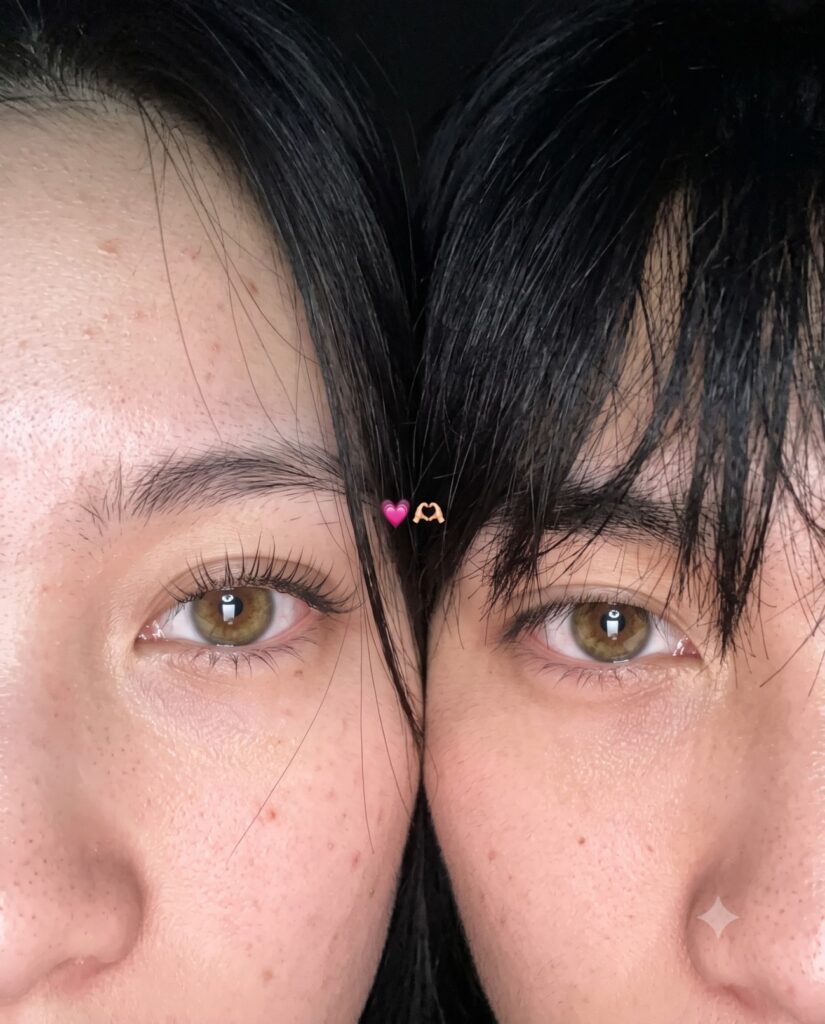
Prompt #5 The Beauty of Unfiltered Moments
To finish off our list of viral Gemini AI photo prompts, here is the ultimate unfiltered, raw selfie edit that looks 100% real.
Use 100% of both faces above the image uploaded Must look exactly like a real iPhone front camera flash selfie uploaded to Instagram, not an AI-generated image. Preserve natural imperfections, realistic skin pores, sensor noise, slight blur, imperfect framing, and authentic smartphone camera artifacts.Create an ultra-realistic candid smartphone selfie of two young people with only the upper half of their faces visible, framed extremely close to the camera. Their faces are pressed together naturally, creating an intimate, cozy composition. The left person shows one eye with long natural eyelashes, while the right person has soft messy black bangs partially covering one eye. Warm hazel-brown eyes with realistic reflections, natural skin texture with tiny pores, faint acne marks and subtle imperfections. Soft black hair with loose strands falling across the face. Low-light indoor environment with a phone flash, soft overexposed highlights, slight motion blur, shallow depth of field, subtle lens softness, realistic digital camera noise, authentic smartphone HDR processing, imperfect focus, natural color tones, cozy late-night aesthetic. A tiny pink heart emoji and heart-hands emoji are placed between both faces. Vertical 3:4 composition, looks like an accidental Instagram story/photo taken on an iPhone, completely photorealistic, raw, unedited, cinematic, no beauty filter, no AI look, no plastic skin, no oversharpening, no extra details, indistinguishable from a real phone photo.
Ratio 4:5
I’m honestly done gatekeeping this stuff. Take the list. Use them. I spent way too long figuring out how to get the aesthetic right on these viral Gemini AI photo prompts, so you might as well take advantage. Make sure you actually change the details, though. Swap the background. Pick a different car. Whatever works for your grid. Drop a comment if you get crazy reach on your next post. I wanna see what you guys make.